# Workspace Tour
Learn what every primary Superwall Agents control does before moving into deeper workflows.
Superwall Agents starts with one simple action: send a prompt. The rest of the workspace adds context, tools, files, schedules, and account settings around that prompt.
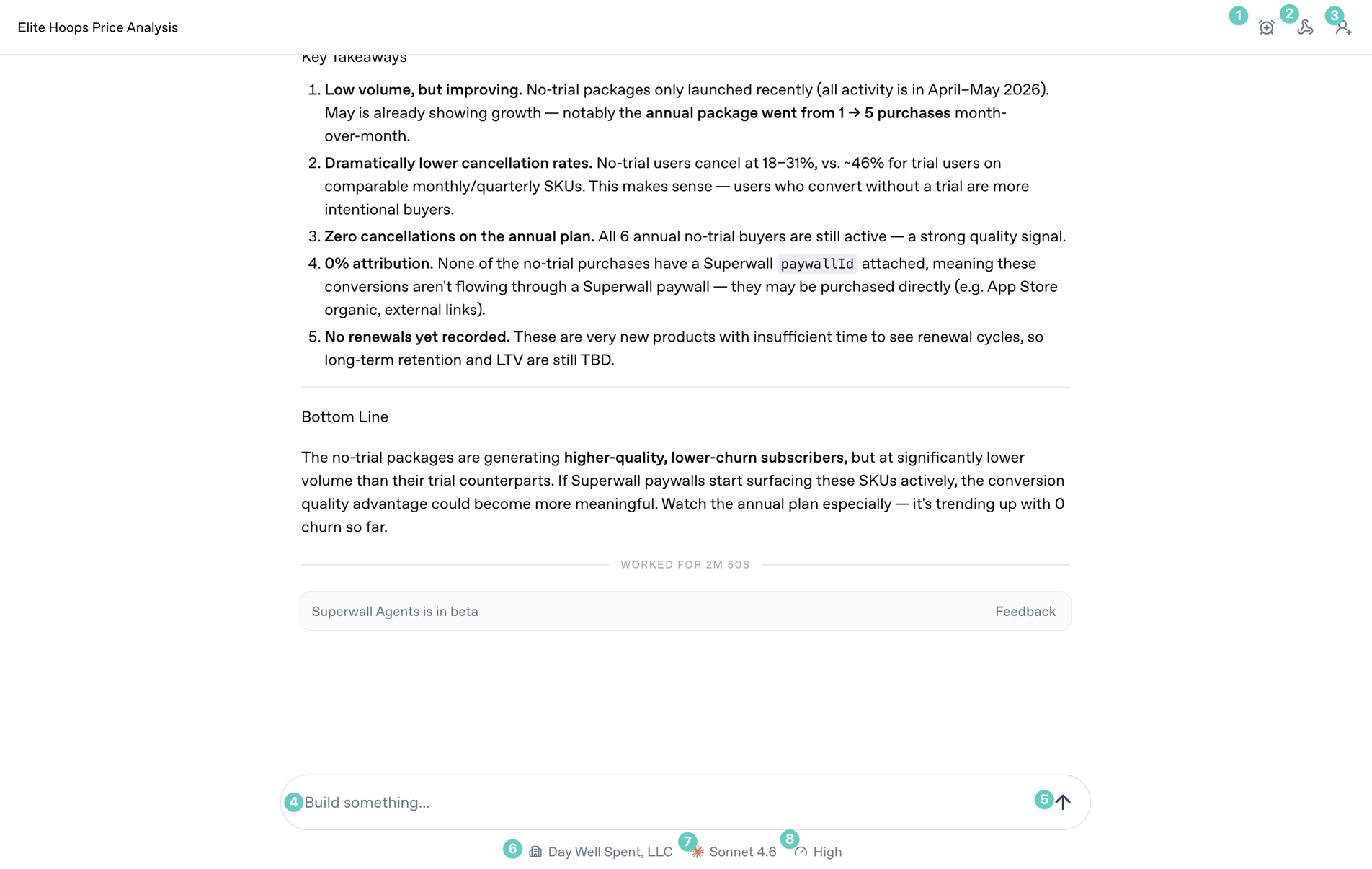 Start screen [#start-screen]
The annotated controls above are the ones you will use most often during a chat:
1. **Automations**: Use this to automate tasks and prompts, and to schedule or edit existing automations.
2. **Webhooks**: Open the webhook settings for the current chat so external systems can trigger it or receive updates from it.
3. **Share**: Share the current conversation when you want someone else to review the transcript or output.
4. **Prompt box**: Type the work you want the agent to do. Use it for analysis, implementation checks, reports, or experiment ideas.
5. **Send arrow**: Start the next turn. If the agent is already working, this control changes state so you can stop or steer the turn.
6. **Organization selector**: Choose which Superwall organization the agent should use for the conversation.
7. **Model selector**: Choose the model for this chat. Use stronger models for ambiguous analysis and debugging.
8. **Reasoning selector**: Choose how much reasoning effort the model should use. Higher effort is useful for experiment analysis, architecture work, and multi-step debugging.
Sidebar [#sidebar]
Start screen [#start-screen]
The annotated controls above are the ones you will use most often during a chat:
1. **Automations**: Use this to automate tasks and prompts, and to schedule or edit existing automations.
2. **Webhooks**: Open the webhook settings for the current chat so external systems can trigger it or receive updates from it.
3. **Share**: Share the current conversation when you want someone else to review the transcript or output.
4. **Prompt box**: Type the work you want the agent to do. Use it for analysis, implementation checks, reports, or experiment ideas.
5. **Send arrow**: Start the next turn. If the agent is already working, this control changes state so you can stop or steer the turn.
6. **Organization selector**: Choose which Superwall organization the agent should use for the conversation.
7. **Model selector**: Choose the model for this chat. Use stronger models for ambiguous analysis and debugging.
8. **Reasoning selector**: Choose how much reasoning effort the model should use. Higher effort is useful for experiment analysis, architecture work, and multi-step debugging.
Sidebar [#sidebar]
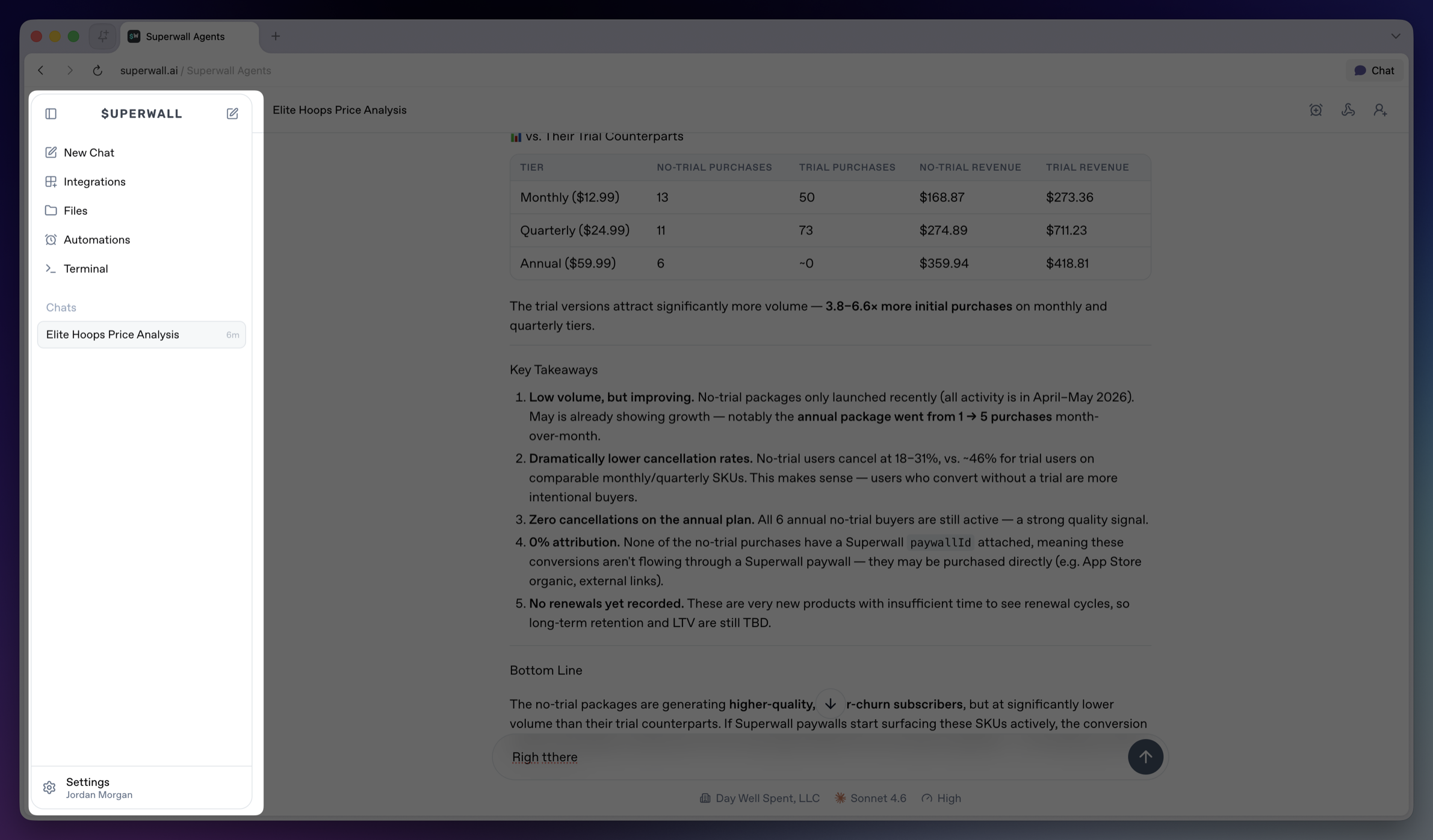 The sidebar is the main navigation for the workspace.
* **Collapse sidebar**: Hides the sidebar on desktop. Use the matching expand control to bring it back.
* **Top New Chat icon**: Returns to the new chat screen.
* **New Chat**: Opens the new chat screen and makes it the active sidebar item.
* **Integrations**: Opens account and tool connections, including GitHub, Slack, and Skills. See [Integrations](/docs/agents/integrations).
* **Files**: Opens the file browser for the active hosted machine. See [Files](/docs/agents/files).
* **Automations**: Opens scheduled prompts for chats. See [Automations](/docs/agents/automations).
* **Terminal**: Opens a terminal connected to the active hosted machine. See [Terminal](/docs/agents/terminal).
* **Chats**: Shows saved chats for the active workspace. Select a row to reopen a chat.
* **Settings**: Opens account, model defaults, environment variables, machines, usage, billing, webhooks, keybindings, and account controls. See [Settings](/docs/agents/settings).
The sidebar is the main navigation for the workspace.
* **Collapse sidebar**: Hides the sidebar on desktop. Use the matching expand control to bring it back.
* **Top New Chat icon**: Returns to the new chat screen.
* **New Chat**: Opens the new chat screen and makes it the active sidebar item.
* **Integrations**: Opens account and tool connections, including GitHub, Slack, and Skills. See [Integrations](/docs/agents/integrations).
* **Files**: Opens the file browser for the active hosted machine. See [Files](/docs/agents/files).
* **Automations**: Opens scheduled prompts for chats. See [Automations](/docs/agents/automations).
* **Terminal**: Opens a terminal connected to the active hosted machine. See [Terminal](/docs/agents/terminal).
* **Chats**: Shows saved chats for the active workspace. Select a row to reopen a chat.
* **Settings**: Opens account, model defaults, environment variables, machines, usage, billing, webhooks, keybindings, and account controls. See [Settings](/docs/agents/settings).